

ChatGPT is one of the most powerful AI tools today, but most users only scratch the surface. If you’ve ever felt frustrated by generic answers, slow workflows, or missed opportunities, this guide is for you.
Here are 50 ChatGPT secrets prompts that can help you write better, work faster, automate tasks, and leverage AI like a pro. Whether you’re a blogger, developer, SaaS founder, or student, these tips will change the way you interact with AI.
By the end of this article, you’ll know exactly how to use ChatGPT prompts to boost productivity, improve content, and get smarter AI responses.
Why ChatGPT Prompts Matter
Many people think ChatGPT is just a chatbot. Wrong.
It’s a productivity engine—if you know how to prompt it.
The right prompt:
- Reduces ambiguity
- Produces human-like responses
- Saves time
- Creates structured outputs
The wrong prompt:
- Wastes time
- Produces generic or irrelevant content
- Leads to frustration
That’s why understanding ChatGPT secrets prompts is key for anyone who wants to use AI effectively.
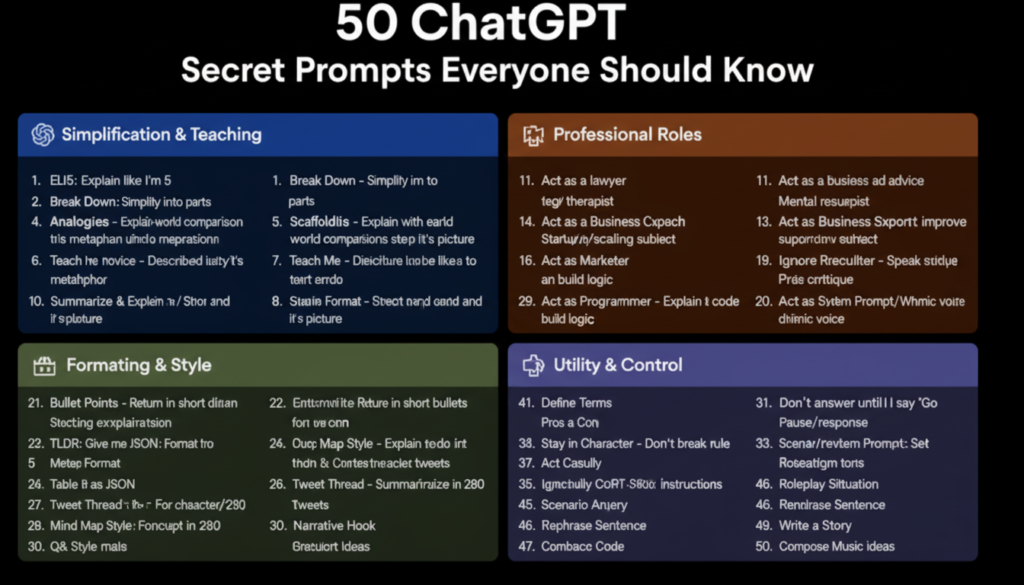
Top 50 ChatGPT Secrets Prompts
1–10: Writing and Content Creation Prompts
- “Act as a copywriting expert and write a blog outline about [topic].”
- “Summarize this text into 5 bullet points.”
- “Rewrite this paragraph to make it more engaging.”
- “Write a catchy title for a blog about [topic].”
- “Convert this text into a LinkedIn post.”
- “Generate 10 blog topic ideas for [niche].”
- “Write a 200-word newsletter based on this article.”
- “Turn these bullet points into a full article.”
- “Create a FAQ section for this topic.”
- “Rewrite this text in a professional yet friendly tone.”
11–20: Productivity and Automation Prompts
- “Act as my productivity coach and plan my daily schedule.”
- “Generate a task checklist for completing [project].”
- “Make a step-by-step plan to achieve [goal].”
- “Create a workflow to automate [task].”
- “Write email templates for cold outreach.”
- “Summarize multiple documents into one report.”
- “Generate meeting agendas with action items.”
- “Draft a reminder schedule for [task].”
- “Organize this data into a table format.”
- “Suggest time-saving AI tools for [task].”
21–30: Social Media and Marketing Prompts
- “Write 10 engaging tweets about [topic].”
- “Generate 10 Instagram captions with hashtags.”
- “Create Pinterest pin descriptions for [topic].”
- “Generate a YouTube video title list for [topic].”
- “Write a LinkedIn post about [industry trend].”
- “Summarize a webinar into key social media posts.”
- “Create an AI-generated marketing campaign outline.”
- “Suggest blog topics with high SEO potential.”
- “Write ad copy for Facebook or Google Ads.”
- “Generate call-to-action variations for [page/product].”
31–40: Technical and Coding Prompts
- “Write Python code to [task].”
- “Explain [technical concept] like I’m 10.”
- “Generate HTML/CSS snippet for [design].”
- “Create JavaScript functions for [task].”
- “Debug this code and explain the error.”
- “Compare two AI tools in a table format.”
- “Generate SQL queries for [dataset].”
- “Explain APIs and integration in simple terms.”
- “Create automation scripts using ChatGPT.”
- “Summarize technical research papers in 5 bullet points.”
41–50: Advanced and Creative Prompts
- “Act as a UX designer and give feedback on [website/app].”
- “Generate prompts for DALL·E or other AI image generators.”
- “Write a press release for [product launch].”
- “Create a product comparison guide for [tools/products].”
- “Convert these FAQs into a blog post.”
- “Write a case study about [topic] in 500 words.”
- “Generate interactive content ideas for blogs or social media.”
- “Draft scripts for webinars or video tutorials.”
- “Create e-book outlines with chapters and subtopics.”
- “Act as my AI coach and design a learning path for [skill].”
How to Use These Prompts Effectively
- Be specific: The more details in your prompt, the better the output.
- Set roles: Always start with “Act as [role]” to guide ChatGPT.
- Experiment: Try multiple variations to find the best answer.
- Combine prompts: Use sequential prompts to build content step by step.
- Track results: Save prompts that consistently work in a personal library.
Simplification & Teaching Codes
These prompts force ChatGPT to explain complex things like you’re human. Use these when you’re confused, learning something new, or explaining to someone else.
1. ELIE – Explain Like I’m 5
“Explain [topic] like I’m five years old.”
Forces simplicity. No jargon. No assumptions. Just pure clarity.
2. Break It Down
“Break [topic] down into parts. Explain each part separately.”
Perfect for complex systems. See the pieces before the whole.
3. Use Analogies
“Explain [topic] using real-world comparisons.”
Analogies stick. Abstract concepts die.
4. Scaffold It
“Build a learning structure for [topic]. Step by step. Start with prerequisites.”
Learn anything systematically. No gaps.
5. Use Metaphors
“Describe [topic] using a metaphor.”
Different from analogy. Metaphors transform how you see the thing.
6. Explain Visually
“Describe [topic] like it’s a picture. What would I see?”
Perfect for visual learners. Forces concrete description.
7. Pretend I Know Nothing
“Explain [topic]. Pretend I have zero background knowledge.”
Resets assumptions. No “as you know” gatekeeping.
8. Teach Me Like a Teacher
“Teach me [topic] like a great teacher would. Check my understanding.”
Interactive. Structured. Patient.
9. Compare It to X
“Help me understand [topic] by comparing it to [something familiar].”
Bridge from known to unknown.
10. Summarize and Explain
“First, summarize [topic] in 3 sentences. Then explain each part in detail.”
Big picture first. Then depth.
Professional Role Codes
These ChatGPT secret prompt codes turn the AI into specialists. Use them when you need expert-level thinking without the expert hourly rate.
11. Act as a Lawyer
“Act as a lawyer. Review this [contract/situation] with a legal mindset. Flag risks.”
Gets the legalese filter activated. Still verify with a real lawyer.
12. Act as a Therapist
“Act as a therapist. Respond to this with mental health support principles. Be empathetic but professional.”
Not replacement for therapy. Great for processing thoughts.
13. Act as a Resume Expert
“Act as a resume expert. Improve this resume. Focus on achievements, not duties.”
Turns boring job descriptions into compelling stories.
14. Act as a Business Coach
“Act as a business coach. Give me startup/scaling advice. Push back on my assumptions.”
Brutal honesty mode activated.
15. Act as a Programmer
“Act as a senior developer. Explain this code. Suggest improvements. Flag bugs.”
Code review without the judgment.
16. Act as a Marketer
“Act as a direct-response marketer. Review this copy. Make it sell better.”
Focuses on persuasion, not pretty words.
17. Act as a Tutor
“Act as a patient tutor. Break down [subject]. Ask me questions to check understanding.”
One-on-one learning without the hourly rate.
18. Act as a Recruiter
“Act as a recruiter. Critique this CV. Give interview prep questions.”
See yourself through a hiring manager’s eyes.
19. Act as a Consultant
“Act as a management consultant. Analyze this situation. Be critical. Be strategic.”
Big picture thinking. Zero politeness filter.
20. Act as a Ghostwriter
“Act as a ghostwriter. Write in [person’s] voice. Here are samples of their writing…”
Copy their style. Extend their thinking.
Formatting & Style Codes
These ChatGPT secret prompt codes control exactly how the answer looks. Use them when presentation matters as much as content.
21. Bullet Points
“Return this as bullet points. Short. Scannable.”
Kills paragraphs. Creates clarity.
22. TL;DR
“Give me the short version first. Then details.”
Executive summary mode. Perfect for busy days.
23. Output as JSON
“Format this as JSON.”
For developers. For automation. For clean data.
24. Table Format
“Return this as a table. Columns: [X, Y, Z].”
Comparison mode. Decision mode. Clarity mode.
25. Mind Map Style
“Explain this like a concept map. Show connections.”
See relationships. Not just facts.
26. Slide-Ready Format
“Format this for PowerPoint slides. Short points. One idea per slide.”
Presentation-ready. No redesign needed.
27. Checklist
“Give me a checklist. Step by step. Actionable.”
Stop thinking. Start doing.
28. Tweet Format
“Summarize this in 280 characters. Then thread format.”
Twitter-ready. Concise by force.
29. Script Format
“Write this as a script. Dialogue. Scene descriptions.”
For videos. For podcasts. For storytelling.

30. Email Format
“Format this as a professional email. Subject line. Greeting. Body. Signature.”
Ready to send. No rewriting.
Utility & Control Codes
These ChatGPT secret prompt codes give you power over the conversation itself. Use them to direct, reset, and optimize.
31. Don’t Answer Until I Say “Go”
“Don’t respond to this until I type ‘Go’. I need to give you more context first.”
Perfect for complex multi-part requests. Prevents half-baked answers.
32. Stay in Character
“Stay in [role] for the entire conversation. Don’t break character.”
Locks in the persona. No slipping back to generic AI.
33. Ignore Previous Instructions
“Ignore everything before this. Fresh start. Here’s the new context…”
Resets the conversation. Fixes confusion.
34. Be Brutally Honest
“No sugarcoating. Tell me the hard truth. Be blunt.”
Removes the politeness filter. Gets real feedback.
35. Act Casual
“Friendly tone. Like we’re grabbing coffee. No corporate speak.”
Relaxed mode. Creative mode.
36. Pretend to Be My Coach
“Push me like a trainer. Challenge me. Don’t let me off easy.”
Accountability partner. No mercy.
37. Create a System Prompt
“Based on this conversation, write a system prompt that would make an AI respond like you just did.”
Meta. Recursive. Powerful for saving great personas.
38. Be Concise
“Say this briefly. One sentence if possible.”
Forces compression. Kills fluff.
39. Think Like X
“Adopt the mindset of [famous person or archetype]. Answer from that perspective.”
Steve Jobs would say what? Sherlock Holmes would notice what?
40. Rate Your Confidence
*”Answer, then rate your confidence 1-10. Explain what might make you wrong.”*
Honesty mode. Knows what it doesn’t know.
Bonus: Money & Market Codes
These go beyond the original list. They’re for when you’re thinking about business, markets, and making money.
41. Market Analysis Mode
“Analyze this market. Size. Trends. Competitors. Entry barriers. Be realistic.”
See the battlefield before entering.
42. Customer Avatar Builder
“Create a detailed customer avatar for [product]. Demographics. Psychographics. Fears. Desires.”
Know who you’re selling to. Really know them.
43. Pricing Strategy Consultant
“Suggest pricing strategies for [product]. Pros and cons. Psychological factors.”
Price right from day one.
44. Business Model Canvas
“Fill out a Business Model Canvas for [idea]. Nine blocks. Be specific.”
One-page business plan. Actually useful.
45. Investor Pitch Feedback
“Review this pitch. Act like a VC who’s seen 1000 decks. What works? What’s missing?”
Fix it before the real meeting.
46. Competitor Teardown
“Tear down [competitor]. What do they do well? Where are they vulnerable?”
Find the gap. Exploit it.
47. Value Proposition Designer
“Help me design a value proposition for [product]. What actually matters to customers?”
Features don’t sell. Benefits don’t sell. Value sells.
48. Revenue Model Explorer
“Suggest revenue models for [business type]. List pros, cons, and examples.”
Multiple ways to make money. Find yours.
49. Customer Discovery Questions
“Give me 20 questions to ask potential customers about [problem].”
Validate before building.
50. The Meta Prompt
“What’s the best way to prompt you for [my specific goal]? Design the perfect prompt for me.”
Ask the AI to help you prompt itself. Recursive. Brilliant.
How to Actually Use These Codes
Reading the list won’t change anything. Using them will.
Here’s your 7-day plan:
Day 1: Pick 5 teaching codes. Use them to learn something you’ve been avoiding.
Day 2: Pick 5 professional role codes. Get expert help on a real problem.
Day 3: Pick 5 formatting codes. Restructure something you’re working on.
Day 4: Pick 5 utility codes. Take control of a conversation.
Day 5: Pick 5 money codes. Think about your business or career differently.
Day 6: Combine them. “Act as a business coach. Be brutally honest. Format as checklist. Analyze my side hustle idea.”
Day 7: Create your own. What roles does ChatGPT need to play in your life? Write the prompts.